The AI Assistant helps you recognize foods and see their nutritional info quickly and easily, using photos instead of manual entry.
You can find it:
under the info panel that shows up on the app’s home screen (the one where you see 'Entitled', 'Burned', 'Consumed' and 'Balance'), or
by tapping the + button at the bottom of the screen and selecting the AI Assistant.
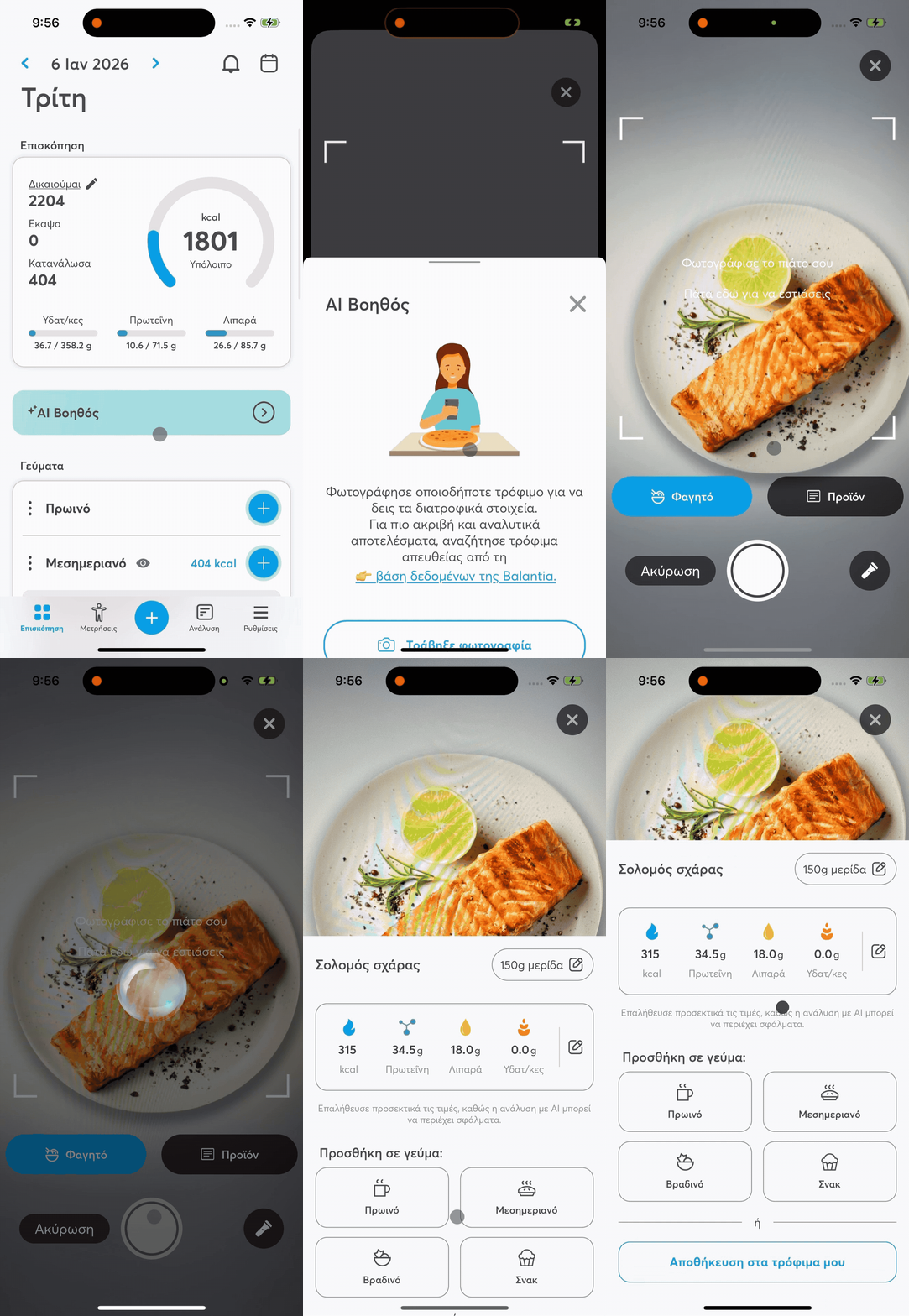
You can use it in the following ways:
📸 Snap a photo of your meal
Tap this option to open the camera. Take a photo of your plate and the AI Assistant will try to automatically recognize the foods in it.
For better results:
Place cutlery or another familiar object next to the plate, so there is a size reference (scale).
Take the photo at an angle, so you can see the thickness and volume of the food (not completely from above).
Make sure there is good lighting, without strong shadows or reflections.
Avoid complex or overly crowded arrangements – the cleaner the image, the more accurate the recognition will be.
🏷 Photograph the label
If it’s a packaged product, you can take a photo of the label with the nutrition facts.
The AI Assistant will read the information and help you register the product.
🖼 Choose from the gallery
If you already have a photo saved on your phone, you can upload it straight from your device gallery.
